

You are deep into an important work project or an assignment when it happens: your computer freezes and that dreaded "Your PC ran into a problem" message appears. It's a moment of pure panic. You're likely staring at your monitor right now, wondering if all your files are gone or if you'll have to spend your Saturday morning driving through Auckland traffic to find a repair shop. If you need a reliable blue screen of death fix Auckland residents trust, you don't have to handle this stress alone.
We know that a crashing computer feels like a major setback, especially when technical error codes look like a different language. You deserve a clear explanation and a solution that doesn't involve disconnecting every cable and hauling hardware across town. This guide will help you understand what's triggering those crashes and how to get a professional on-site repair today. We'll look at why the June 2026 Windows 11 update might be the culprit and how we'll help you recognise hardware faults without losing your precious photos or documents.
Key Takeaways
- Understand that the Blue Screen of Death is actually your computer's way of protecting itself from permanent hardware damage. It acts like a "check engine" light for your PC to prevent further issues.
- Learn to distinguish between "Software Gremlins" like dodgy Windows updates and serious "Hardware Heartaches" that require expert attention.
- Discover the safe DIY checks you can perform at home and the warning signs, like clicking sounds, that mean you should stop immediately.
- Find out how to get a professional blue screen of death fix Auckland wide without having to leave your house or brave the motorway.
- Get peace of mind knowing that a blue screen doesn't necessarily mean your files are gone, provided you follow the right data protection steps.
What is the Blue Screen of Death (BSOD)?
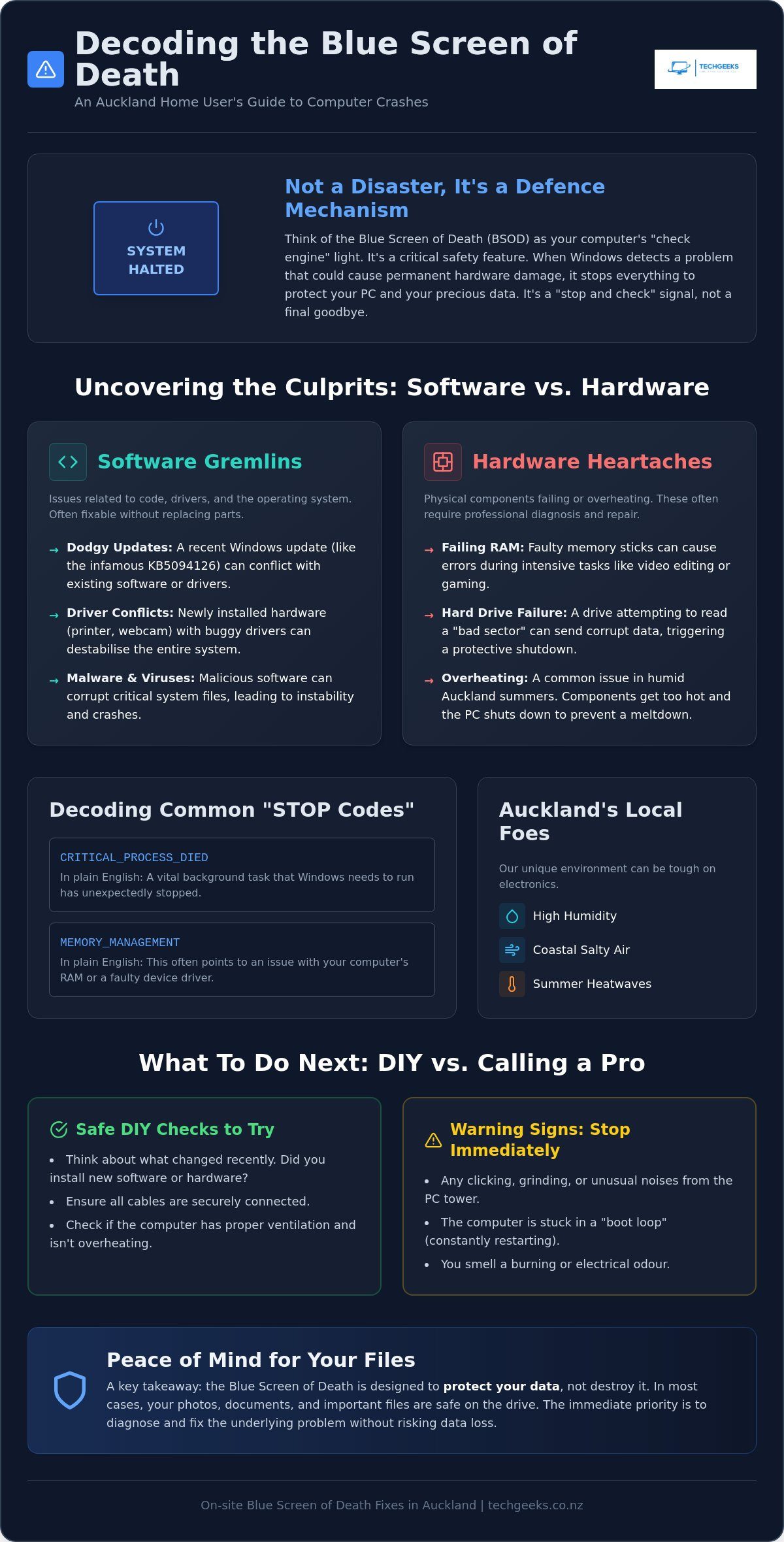
Think of the Blue Screen of Death like your car's "check engine" light. It's bright, it's startling, and it usually appears exactly when you're in the middle of something important. While that wall of blue text looks like a digital disaster, it's actually a safety mechanism. Windows is designed to halt everything immediately if it senses a problem that could cause permanent damage to your hardware. It's a "stop and check" signal rather than a final goodbye to your computer.
To understand the technical history of What is the Blue Screen of Death, you can look at how operating systems have evolved to protect themselves. Most of the time, the trigger is a fixable software conflict or a minor hardware hiccup. If you're searching for a professional blue screen of death fix Auckland experts can handle, the first thing to do is take a deep breath. Your precious photos, work documents, and emails are usually sitting safely on your drive, tucked away behind that blue wall. The screen is there to keep them safe, not to delete them.
Common STOP Codes You Might See
When your screen goes blue, it usually displays a "STOP code" at the bottom. These might look like "Critical Process Died" or "Memory Management". In plain English, "Critical Process Died" often means a background task Windows needs just stopped working, while "Memory Management" usually points toward a struggle with your RAM or a faulty driver. A STOP code is a hexadecimal diagnostic tool used by technicians to identify the specific root cause of a system crash. These codes are the "key" we use to find a fast blue screen of death fix Auckland wide, ensuring we don't waste time guessing what's wrong.
Why Your PC Just Restarted Randomly
Sometimes you don't even get a chance to read the code. Your PC might just blink and restart, or get stuck in a "boot loop" where it keeps trying to start and failing. This happens because Windows is often set to automatically restart after a system failure. It's trying to recover on its own, but it can get trapped in a cycle if the underlying issue isn't resolved.
In our experience, environment matters. We often see these crashes spike during a humid Auckland summer. Excessive heat can cause internal components to struggle, triggering a safety shutdown to prevent a total hardware meltdown. If your laptop feels like it's boiling before it shuts down, the local weather might be contributing to those frustrating crashes. We see this across all brands, so whether you're using a high-end gaming rig or a basic office laptop, heat is a common enemy.
Common Causes of Computer Crashes in Auckland Homes
Pinpointing the exact cause of a crash can feel like finding a needle in a haystack. Most issues fall into two categories: "Software Gremlins" or "Hardware Heartaches". If you are looking for a blue screen of death fix Auckland wide, we usually start by asking what changed recently. Did you install a new printer or a high-def webcam? Often, new hardware is the primary culprit. A new device requires a specific driver to talk to Windows; if that driver is buggy, the whole system can collapse in a heartbeat.
Auckland's unique environment also plays a role. If you live near the coast in areas like Mission Bay or the North Shore, salty air and high humidity can be silent killers. Over time, salt spray leads to internal corrosion on the motherboard or connectors. Even fine dust buildup in a humid home can cause components to overheat. Microsoft is constantly working on preventing future BSOD events by improving how Windows handles these errors, but local environmental factors remain a constant challenge for Kiwi computers.
Software and Driver Conflicts
Software issues are frequently triggered by "dodgy" updates. For example, the Windows 11 update released in June 2026 (KB5094126) was notorious for causing boot loops and system freezes. When an update clashes with your existing setup, the system doesn't know how to proceed and shuts down. Malware and viruses are also major destabilisers. They can corrupt vital system files, leading to a total loss of stability. If your PC has become sluggish or behaves erratically, our virus removal Auckland service can clean out the infection and restore order to your operating system.
Hardware Failures: RAM and Hard Drives
Hardware failures are often more deceptive. A failing hard drive might work perfectly fine for an hour before it tries to access a "bad sector" and sends corrupted data to Windows. This immediate confusion triggers the blue screen. Then there is the "silent killer": faulty RAM. These memory sticks might only fail when you are doing something intensive, like editing a video or running a complex spreadsheet. If your PC crashes only when it's working hard, it's likely a memory issue. If your drive has already given up the ghost, don't panic. We specialise in data recovery Auckland to help you get those irreplaceable files back before we replace the faulty part.
If you've noticed your computer acting up after a recent update or a move to a new home, it might be time for a professional check-up. Our hardware troubleshooting team can visit your home and find the root cause without you having to lift a finger.
DIY Fixes vs. Calling a Professional Technician
Most Aucklanders would rather spend their Saturday at Mission Bay or hiking the Waitakere Ranges than staring at a frozen monitor. When your PC crashes, the temptation to "just google it" is strong. You might find a dozen different forum threads, each suggesting a different "magic" fix. While some minor errors can be sorted at home, trying to find a reliable blue screen of death fix Auckland residents can trust often requires more than just a quick search. Is it worth losing your whole weekend to a problem that a professional could solve in an hour?
Before you call for help, try the "Safe Mode" trick. This is like putting your computer into a "limp home" mode. It starts Windows with only the most basic files and drivers. If your PC stays stable in Safe Mode, you likely have a software or driver issue rather than a hardware failure. However, if you hear any clicking, grinding, or whirring sounds coming from your case, stop immediately. These are physical warning signs that your hardware is failing. Continuing to restart a clicking computer can lead to permanent data loss.
When to Try a Quick DIY Fix
If your computer is still responsive enough to reach the desktop occasionally, try these steps first to see if the issue is a simple conflict:
- Disconnect every external device except your mouse and keyboard. Printers, webcams, and external hard drives are frequent crash triggers.
- Run a System File Checker (SFC) scan. Open the Command Prompt as an administrator and type
sfc /scannowto let Windows repair its own files. - Check the internal temperature. If your fans are screaming or the case feels hot to the touch, your PC might be crashing to protect itself from heat damage.
The Risks of 'Home Surgery' on Your PC
Opening up a laptop or desktop case without the right tools or experience is risky. Static electricity is a silent killer of motherboards. One tiny spark from your fingertip can fry a component that was working perfectly. There is also the danger of the "Windows Refresh" option. If you select the wrong setting during a reset, you could accidentally wipe your entire "Documents" and "Pictures" folder. This is why professional hardware troubleshooting Auckland is a safer investment. We have the anti-static equipment and diagnostic tools to find the fault without putting your data at risk. A professional blue screen of death fix Auckland wide saves you from the stress of making a bad situation worse. We can identify if a component is truly dead or just needs a driver update, preventing you from buying expensive replacement parts you don't actually need.
Protecting Your Data During a BSOD Event
The moment that blue screen appears, the first thing most people worry about isn't the computer itself. It's the years of family photos, the half-finished thesis, or the crucial business spreadsheets stored inside. It's a gut-wrenching feeling. However, it's vital to remember that a blue screen is usually a protective barrier, not a delete button. Your data is likely still exactly where you left it. The most important thing you can do right now is stay calm and avoid forcing multiple restarts, especially if your computer is making unusual sounds.
If you hear clicking, grinding, or a repetitive whirring sound, turn the power off immediately. These are signs of a physical hardware struggle. Repeatedly trying to reboot in this state can cause the read-write heads to scratch the internal platters of your hard drive, making data recovery much harder. When you call us for a blue screen of death fix Auckland wide, our technicians treat your data as the top priority. We don't just aim to get Windows running again; we ensure your files are shielded throughout the entire repair process.
Is My Data Gone Forever?
Most of the time, the answer is a relieving "no". There is a big difference between a logical system crash and a physical hard drive failure. A logical error means the software got confused, while the physical drive is still healthy. Most BSOD events are logical. Your files are still there, but Windows just can't load or access them properly at the moment.
On-site Blue Screen of Death Fix Auckland: We Come to You
The last thing you want to do when your computer fails is disconnect a dozen cables, lug a heavy desktop to your car, and brave the gridlock on the Southern Motorway. It's a massive hassle that often leads to more damage during transport. We believe a blue screen of death fix Auckland residents can rely on should be convenient and stress-free. That is why we bring the workshop to your front door. Whether you are in a high-rise in the CBD, a family home on the North Shore, or out on the Hibiscus Coast, our mobile technicians are ready to help.
Our fleet of mobile "utes" acts as a fully functional repair centre on wheels. We don't just turn up with a screwdriver; we carry professional diagnostic tools and a range of common spare parts. This means we can often provide a blue screen of death fix Auckland wide in a single visit. Our goal is always a same-day resolution because we know how much you rely on your PC for work, study, or staying connected with family. We value your time as much as you do and strive to get you back to your routine as quickly as possible.
Why On-site Repair is Better than a Shop
When you take your PC to a traditional shop, it often sits on a shelf for days before a technician even looks at it. With our on-site service, you can watch the repair happen in real-time in your own lounge or office. This transparency builds trust. You see exactly what we are doing and why. Plus, we can check factors that a shop technician simply can't see, such as your home network stability or a faulty power point that might be causing those mysterious crashes. It's a holistic approach that ensures the problem doesn't return the moment we leave.
How to Book Your Auckland PC Fix
Booking a visit is straightforward and fast. You don't need to be a tech expert to talk to us. We have a strict "no jargon" policy, meaning we explain the fault and the fix in plain, easy-to-understand English. We'll tell you if it's a software conflict or a hardware part that needs replacing without any confusing "geek speak." If you're ready to get your computer sorted without the headache of travel, book a Tech Geeks expert now. Don't spend another hour staring at a blue screen when a professional fix is just a phone call or a click away.
Get Your Computer Back on Track Today
Staring at a blue screen doesn't have to be the end of your productive week. Your computer is often just trying to protect itself from a temporary software clash or a hardware hiccup. By choosing a professional blue screen of death fix Auckland residents can trust, you avoid the risk of transport damage and the frustration of motorway traffic. Our friendly local technicians bring expert hardware diagnostics directly to your door. We ensure your data remains safe while we find the root cause. Whether it's a buggy update or a salty breeze from the coast causing the trouble, we have the tools to sort it. Don't let a technical glitch hold you back any longer.
Get your BSOD fixed on-site today: Contact Tech Geeks Auckland
We are ready to get your PC back to its best so you can focus on what matters most.
Frequently Asked Questions
Can a virus cause a blue screen of death?
Yes, a virus or malware infection can definitely trigger a blue screen. Some malicious software is designed to target or corrupt critical Windows files. When the operating system can't find the data it needs to function, it shuts down immediately to prevent further damage. If your computer is crashing and behaving oddly, such as showing strange pop-ups or running slowly, a professional virus scan is a vital part of finding a permanent fix.
How much does a blue screen of death fix in Auckland cost?
The cost of a blue screen of death fix Auckland residents receive depends on whether the issue is software or hardware based. Simple software conflicts or driver issues are generally more straightforward to resolve. Hardware failures, such as a dead hard drive or faulty RAM, will involve the price of replacement parts. We focus on clear communication and will always explain the necessary work and any part requirements before we start the repair.
Will I lose my photos and files if I get a BSOD?
You usually won't lose your files just because a blue screen appeared. Most of these errors are "logical" problems with the software or drivers, meaning your photos and documents are still sitting safely on the drive. However, if the crash is caused by a physically failing hard drive, your data could be at risk. This is why we prioritise data integrity and offer specialised recovery services if your hardware is struggling to read files.
Is it worth fixing an old laptop with a blue screen?
It is often worth fixing if the problem is a simple software conflict or a buggy update. If your laptop is less than five years old, the Consumer Guarantees Act in New Zealand suggests it should still be of acceptable quality. However, if the repair requires expensive hardware for a very old machine, we'll give you an honest opinion. We want you to have a cost-effective solution rather than spending money on a dying device.
How long does an on-site computer repair take?
Most on-site repairs are completed within one to two hours of our arrival. Because our mobile units are fully stocked with diagnostic tools and common spare parts, we can often provide a blue screen of death fix Auckland wide in a single visit. If your repair is more complex or requires a very specific part, we will give you a clear timeline and explain the next steps so you can plan your day.
What should I do if my computer keeps restarting after a blue screen?
You should turn the power off immediately if your computer is stuck in a restart loop. This "boot loop" puts unnecessary stress on your hardware, especially if a failing component is the root cause of the crash. Continuous restarting can also make data recovery more difficult if the hard drive is the part that is failing. Powering down is the safest way to prevent further complications until a professional can take a look.
Does Tech Geeks fix all computer brands in Auckland?
Yes, we provide repairs for all major brands, including HP, Dell, Lenovo, ASUS, and Acer. Our technicians are experienced with a wide variety of hardware configurations, so you don't need to worry if you have a custom-built gaming rig or a standard office laptop. We bring the right tools and expertise to handle any brand across the entire Auckland region, from the CBD to the North Shore and beyond.
Can overheating cause my PC to crash to a blue screen?
Overheating is a very common cause of system crashes, especially during a humid Auckland summer. If your computer's internal temperature gets too high, Windows will trigger a blue screen to shut the system down before the hardware sustains permanent damage. Dust buildup or failing fans are usually the culprits. Cleaning out the vents and checking the cooling system often resolves these types of frequent crashes and improves overall performance.

