

Why spend NZ$2,000 on a brand-new laptop when your current machine is just a memory boost away from peak performance? It is incredibly frustrating when your computer freezes during a critical Zoom call or chokes while you are trying to multitask between simple tabs. You have probably felt the urge to replace the whole unit, especially with the confusing jargon surrounding DDR4 versus DDR5 standards. We understand that the last thing you want is to dismantle your home office just to sit in Auckland traffic on the way to a retail repair shop.
A professional RAM upgrade Auckland service is the most effective way to bypass the high cost of new hardware in 2026. With DRAM spot prices reaching record highs this year, choosing the right upgrade path is more important than ever. In this article, we will show you how an on-site hardware boost can restore your speed and reliability without the premium price tag of a new PC. You will discover how to navigate the current "RAM crisis" and why having a friendly expert come to your door is the smartest move for your productivity and your budget.
Key Takeaways
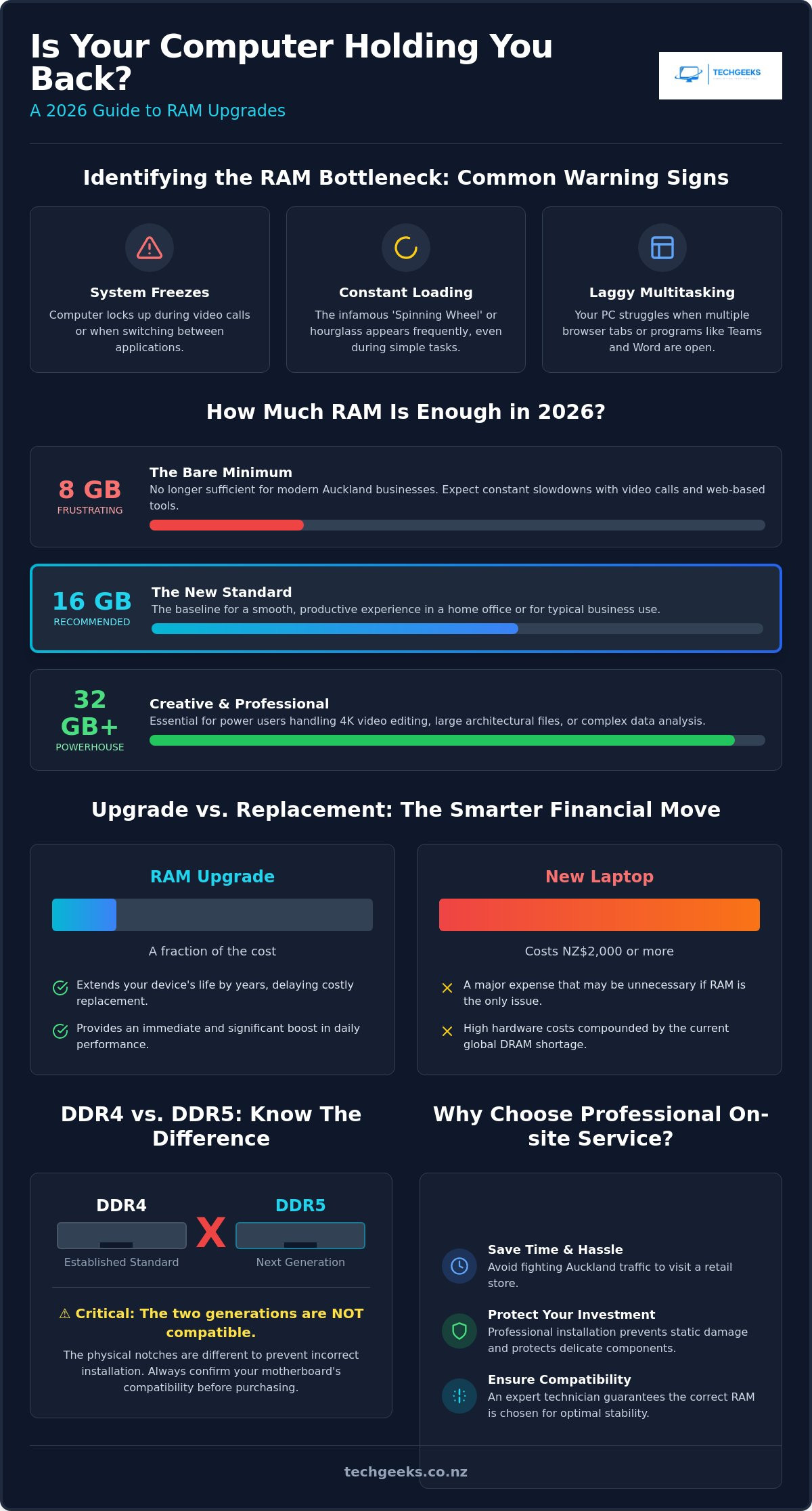
- Learn to identify the clear warning signs that your computer is memory-starved and why 8GB is no longer sufficient for modern Auckland businesses.
- Understand the critical differences between DDR4 and DDR5 memory to navigate the 2026 pricing crisis without making a compatibility mistake.
- Discover how a professional RAM upgrade Auckland service can extend your device's life by years for a fraction of the cost of a new NZ$2,000 machine.
- Explore the massive convenience of mobile hardware troubleshooting that saves you from fighting Auckland traffic to visit a retail store.
- Find out why professional on-site installation is the safest way to protect your computer from static damage and delicate component failures.
Is your computer struggling to keep up? Identifying the RAM bottleneck
Does your laptop feel like it's wading through treacle? You click an icon and wait. You switch tabs and the screen freezes. These aren't just minor annoyances; they are clear signs your hardware is gasping for air. When your system runs out of physical memory, it starts using your hard drive as a backup. This process is incredibly slow and leads to the infamous "Spinning Wheel of Death" or the Windows hourglass. If your productivity is stalling because your machine can't keep up with your thoughts, you're likely facing a memory shortage.
Back in 2020, 8GB was the standard for a reliable work machine. In 2026, it's a recipe for constant frustration. Modern Auckland businesses rely on heavy web-based tools, high-resolution video calls, and complex spreadsheets. If you're running Microsoft Teams while trying to edit a shared document, 8GB will likely hit 90% usage immediately. This is where a RAM upgrade Auckland becomes essential. It gives your computer the "desk space" it needs to handle multiple tasks at once without stuttering or crashing when you need it most.
You don't need to be a tech wizard to confirm the problem yourself. On a Windows machine, press Ctrl+Shift+Esc to open Task Manager and click the 'Performance' tab. On a Mac, open Activity Monitor from your Applications folder and look at the Memory tab. If that memory pressure graph is consistently in the red or yellow, you've found your bottleneck. It's a physical limitation that no amount of "system cleaning" software can truly fix.
RAM vs. CPU vs. SSD: What’s actually slowing you down?
Think of your CPU as the chef and your RAM as the kitchen bench. No matter how fast the chef is, they can't work efficiently if the bench is cluttered. To understand what RAM is in more detail, think of it as your computer's high-speed short-term memory. While an SSD stores your files long-term, RAM holds the data you are using right now. If your computer takes forever to turn on, that's usually an SSD issue. However, if it slows down as soon as you open your third or fourth application, that's a memory bottleneck. A RAM upgrade Auckland is often the most cost-effective way to see an immediate boost in daily speed.
The impact of modern web browsers on your system
Web browsers like Chrome and Edge have become incredibly sophisticated, but they are notorious memory hogs in 2026. Each open tab is like a mini-application running in the background. If you keep twenty tabs open while jumping into a Zoom or Teams meeting, your RAM is under immense pressure. Video conferencing requires significant resources to process live audio and video data simultaneously. Without enough memory, your video will lag and your audio will drop out, making professional remote work difficult. Increasing your capacity ensures your browser doesn't swallow your entire system's performance.
The 2026 guide to memory: DDR4, DDR5, and how much is enough
Choosing the right memory isn't just about picking the biggest number on the shelf. In 2026, we are seeing a major transition between DDR4 and DDR5 standards. These generations aren't compatible; you cannot plug a DDR5 module into a DDR4 slot. The physical notches are in different places to prevent hardware damage. If you are planning a RAM upgrade Auckland, the first step is identifying which generation your motherboard supports. Mixing and matching different generations is impossible, and even mixing different brands of the same generation can sometimes cause stability issues or "blue screen" errors.
Capacity is where most people get stuck. For a standard home office or a typical Auckland business setup, 16GB has become the new baseline for a smooth experience. If you are a creative professional handling 4K video or large architectural files, 32GB or 64GB is a much safer bet. You can check this guide on how much RAM you need in 2026 to see exactly where your usage sits. With the current global DRAM shortage driving up prices, it's smarter to buy exactly what you need rather than overspending on capacity that will sit idle.
Laptop vs. Desktop RAM: SODIMM vs. DIMM
Size matters when it comes to memory modules. Desktop computers use DIMM sticks, which are long and distinctive. Laptops use SODIMM modules, which are about half the length to fit into cramped portable chassis. SODIMM stands for Small Outline Dual In-line Memory Module and is the standard form factor for almost all non-desktop computers. Be aware that many modern ultra-thin laptops now have "soldered" RAM. This means the chips are permanently fixed to the board and cannot be changed. If you're worried about compatibility, our on-site hardware troubleshooting can quickly confirm if your device is upgradeable.
Speed and Latency: Do they matter for everyday tasks?
You will see RAM marketed with speeds like 3200MHz or 5600MT/s. While faster is technically better, the real-world difference for spreadsheets and web browsing is often tiny. High-end "overclocked" memory is usually an unnecessary expense for office work. The critical factor is ensuring the speed you buy matches what your computer's motherboard can actually handle. If you install high-speed RAM in an older system, the computer will simply force it to run at a slower speed. This makes a professional RAM upgrade Auckland valuable, as an expert ensures you don't pay for performance your machine can't even use.
Upgrade vs. Replacement: Why a RAM boost is the smarter financial move
Faced with a stuttering computer, many Aucklanders instinctively head to a retail store to browse new laptops. In 2026, a mid-range machine capable of handling modern workloads often starts at NZ$2,000. It is a significant investment that many households and businesses would rather avoid. Choosing a RAM upgrade Auckland instead allows you to bypass this massive expense while achieving a similar result in daily speed. By simply expanding your system's "short-term memory", you can often eliminate the very performance issues that were making you consider a replacement in the first place.
Most computers built in the last few years are still equipped with capable processors. They aren't "slow" because the technology is obsolete; they're slow because modern software demands more resources than the factory-installed memory can provide. When you invest in upgrading your memory, you are effectively extending the lifespan of your device by another two to three years. This delay in the replacement cycle keeps more money in your pocket and significantly reduces the amount of e-waste ending up in New Zealand landfills.
There is also the "hassle factor" to consider. Buying a new PC is only the first step. You then face hours of migrating files, reinstalling software, and trying to remember passwords for every single account. An on-site RAM upgrade Auckland keeps your digital life exactly where it is. You get the speed of a new machine without the headache of a total system migration. It is the most efficient way to get back to work or play with zero downtime and no lost data.
Calculating the ROI on your hardware
How do you know if your machine is worth the effort? We generally follow the five-year rule for hardware relevance in 2026. If your computer was purchased within the last five years, it is almost certainly a prime candidate for an upgrade. A quality RAM kit typically costs less than 10% of the price of a new entry-level PC. This small investment delivers a massive return on investment by making your current tool feel snappy and responsive again, saving you from a NZ$2,000 bill.
Small business considerations in Auckland
For Auckland business owners, upgrading a fleet of office PCs is often far more logical than a full capital expenditure on new hardware. It allows your team to stay productive on familiar devices while avoiding the logistical nightmare of a company-wide rollout. From a tax perspective, repairs and maintenance are generally fully deductible in the year the expense occurs. Under current Inland Revenue (IRD) rules, new assets over NZ$1,000 must typically be depreciated over several years. This makes a memory boost a smarter, more immediate way to manage your business's cash flow.
Professional on-site installation: The Tech Geeks way in Auckland
Why wrestle with cables and fight Auckland traffic just to drop your PC at a retail service centre? Most major retailers require you to bring your machine to them, often leaving you without a computer for several days while it sits in a queue. Our approach is different. We bring the RAM upgrade Auckland service directly to your doorstep, whether you are working from a home office in Ponsonby or a corporate suite in the CBD. This eliminates the risk of damaging your hardware during transport and keeps your sensitive data right where it belongs: with you.
Attempting a DIY installation might look simple on a video, but modern hardware is incredibly sensitive. A single spark of static electricity from your fingertips can fry a motherboard instantly. We have seen many well-intentioned "home fixes" end with broken plastic clips or improperly seated modules that cause random system crashes. When we arrive for an on-site visit, we handle the delicate internal components with professional-grade tools and grounding equipment to ensure your machine remains safe throughout the process.
Covering all of Auckland: From the North Shore to the CBD
We understand the Auckland motorway crawl is nobody's idea of a good time. Our mobile technicians manage the travel so you don't have to, offering flexible scheduling that fits around your work-from-home routine or office hours. While we are there for your memory boost, we can also perform a quick check for other hardware issues. This ensures your entire system is running at its peak before we leave your home or office.
The safety of professional handling
Professional installation is about more than just clicking a stick into a slot. We follow strict anti-static protocols and ensure your BIOS settings are correctly optimised to take full advantage of the new hardware's speed. This level of care gives you total peace of mind and protects any existing warranties on your machine. If you want to skip the technical stress and get straight to the speed, you can book your on-site hardware troubleshooting now.
Once the physical installation is complete, we don't just pack up and leave. We run comprehensive post-installation tests to verify that your operating system recognises the new capacity and that the memory is functioning perfectly under load. This final verification ensures that when you sit back down to work, your computer is ready to handle every tab, call, and application without a single hiccup. Choosing a professional RAM upgrade Auckland means you get a guaranteed result without the risk of a DIY disaster.
Choosing a reliable Auckland technician for your hardware upgrades
Finding the right person to open your computer is about more than just technical skill. You need someone who respects your time and your data. A reliable technician should offer transparent, jargon-free advice that helps you make an informed decision rather than pressuring you into a sale. When you are looking for a RAM upgrade Auckland, prioritise services that value clear communication and local expertise. You want a partner who treats your machine with the same care they would their own.
Mobile service has become the gold standard for busy Aucklanders in 2026. Taking a PC to a shop is a chore that often leaves you without a working device for days. On-site service changes the dynamic entirely. You can watch the upgrade happen and ask questions in real-time. This level of transparency builds trust and ensures you are completely satisfied with the result before the technician leaves. It is the most efficient way to handle hardware troubleshooting without disrupting your life.
The Tech Geeks difference: Friendly, local, and expert
We pride ourselves on being more than just a repair service. We are your dependable local guides through the often confusing world of computer hardware. Our focus is always on delivering a result that makes your daily life easier. We don't just sell parts; we provide solutions that get you back to work or play with zero fuss. If your screen is flickering or your battery is failing alongside your memory issues, we can help there too. Explore our on-site laptop repair services to see how we handle everything from screen replacements to complex internal fixes.
Ready to speed up your PC?
Getting your computer back to peak performance is a simple process. You don't need to spend hours researching part numbers or compatibility charts. Just head to our website and use our straightforward booking tool to request a mobile technician. To make the visit as smooth as possible, ensure you have a clear, well-lit workspace ready for our arrival. We handle the technical heavy lifting while you focus on your day.
A professional RAM upgrade Auckland is the single most effective way to breathe new life into your machine. Stop waiting for your computer to catch up and start working at the speed you deserve. Book your on-site RAM upgrade with Tech Geeks now and experience the difference that professional, local service makes for your productivity.
Ready to reclaim your computer's speed?
Your computer doesn't have to be a source of daily frustration. As we have explored, a professional RAM upgrade Auckland is the most cost-effective way to bypass the high expense of new hardware while extending your device's life by years. By identifying your specific memory needs and choosing the right DDR4 or DDR5 modules, you can eliminate the "Spinning Wheel of Death" for good. You get to keep your files, your settings, and your sanity without the hassle of a total system migration.
Our friendly, local Kiwi technicians are ready to help with professional hardware troubleshooting directly at your home or office. We provide expert on-site service across Auckland, ensuring your system is optimised and stable before we leave. There is no need to struggle with a slow machine or risk a DIY disaster. Get your computer sorted with an on-site RAM upgrade from Tech Geeks today. It is time to enjoy a faster, smoother, and more reliable digital experience.
Frequently Asked Questions
Will upgrading my RAM make my internet faster?
No, it won't increase your raw internet connection speed, but it will make your web browsing feel much snappier. When you have more memory, your browser can keep more tabs active without constant reloading. This eliminates the lag you feel when clicking between a news site and your email, making your online experience feel smoother even if your fibre speed remains the same.
Can I upgrade the RAM in my MacBook or iMac in Auckland?
It depends entirely on your specific model and year. Most iMacs and older MacBooks are excellent candidates for a RAM upgrade Auckland service. However, modern MacBooks with Apple Silicon chips have memory integrated into the processor, which cannot be changed. We can check your serial number to confirm your upgrade options before we schedule an on-site visit to your home or office.
How long does an on-site RAM upgrade actually take?
Most on-site upgrades are completed within 30 to 60 minutes. Our technician will arrive, perform a quick diagnostic check, install the hardware, and run stability tests to ensure the new memory is recognised correctly. This is a massive time-saver compared to leaving your computer at a retail service centre for several days while it sits in a repair queue.
Do I need to back up my data before a RAM upgrade?
While a memory upgrade doesn't involve your hard drive or files, we always recommend having a current backup before any hardware work. It is a standard safety precaution for any computer maintenance. Our technicians take every care to protect your system, but having your data saved to a cloud service or external drive provides total peace of mind during the process.
Will adding more RAM void my manufacturer's warranty?
Generally, adding RAM to a desktop computer does not void your warranty, but some laptops have "warranty void if removed" stickers over the internal screws. In New Zealand, the Consumer Guarantees Act provides strong protections for your right to maintain your property. We follow professional installation standards to minimise risk, but it is always worth checking your specific manufacturer's terms if your device is still under its first year of cover.
What is the difference between 8GB and 16GB of RAM for office work?
The difference is noticeable as soon as you multitask. 8GB is the bare minimum for modern operating systems, often leading to stuttering during Zoom or Teams calls. 16GB provides the necessary "breathing room" for modern Auckland businesses, allowing you to run complex spreadsheets, dozens of browser tabs, and communication tools simultaneously without your computer gasping for air.
Can you upgrade RAM on a laptop that has 'soldered' memory?
No, if the memory is soldered directly to the motherboard, it cannot be physically upgraded. This design is common in ultra-thin "ultrabooks" and the latest MacBook models. If you aren't sure about your laptop's internal configuration, we can perform hardware troubleshooting to identify if your machine has an available expansion slot or replaceable memory modules.
Do Tech Geeks provide the RAM parts, or do I need to buy them first?
We specialise in professional installation and hardware troubleshooting rather than hardware sales. This means we provide unbiased advice on exactly which memory kit is compatible with your system so you can secure the best market price. Once you have the parts, our RAM upgrade Auckland service ensures they are installed with professional care and tested for perfect stability.

