

How much unsaved work would you lose if your screen went black right this second? It is a terrifying thought, yet it is the daily reality for many locals when their computer keeps crashing Auckland wide. Whether you are halfway through a crucial business report or organising years of family photos, a sudden system failure feels like a digital heart attack. You have likely spent hours scouring Google for a quick fix, only to end up more frustrated by technical jargon and conflicting advice.
We agree that the last thing you want is the hassle of unplugging every cable to lug a heavy machine through Auckland traffic. You deserve a solution that comes to you. In this article, you will discover the most common causes of PC instability, from hidden malware to failing hardware. We will show you how to get your system sorted fast with professional on-site support that protects your data and restores your peace of mind without you ever having to leave your front door.
Key Takeaways
- Identify the difference between a "soft crash" and a "hard crash" to determine if your system needs a quick restart or a deeper technical diagnosis.
- Understand why your computer keeps crashing Auckland wide, noting that while many issues are software-based, others involve hardware that requires expert handling.
- Learn the safe DIY steps you can take at home and why securing a full backup is your best defence against unexpected data loss.
- Discover the potential dangers of self-repair, from voiding your manufacturer’s warranty to accidentally wiping your most precious files.
- Explore the convenience of mobile on-site repairs that eliminate the need to travel across the city, getting your setup sorted right where you are.
Why Your Computer Keeps Crashing: Common Causes in Auckland
It is 2:00 PM on a Tuesday. You are deep in a project when your screen suddenly freezes. The cursor won't budge. Seconds later, your PC restarts itself. If your computer keeps crashing Auckland wide, you are not alone. This is not just a minor annoyance; it is a disruption that triggers genuine anxiety about data loss and wasted time. To find a lasting solution, we first need to understand what is a computer crash and why it happens. Essentially, a system crash is a protective measure by the operating system to prevent hardware damage. It is your PC's way of pulling the emergency brake before things get worse.
The psychological toll of tech failure is often underestimated. When your tools fail, it feels personal. There is a specific type of stress that comes from staring at a blank screen, wondering if your files are gone forever. We see this daily in our on-site visits across the city. The goal is to move from that state of panic to a state of being "sorted." Distinguishing between a "soft crash," where a single app closes, and a "hard crash," where the entire system reboots, helps determine the severity of the issue.
Identifying Your Crash Type
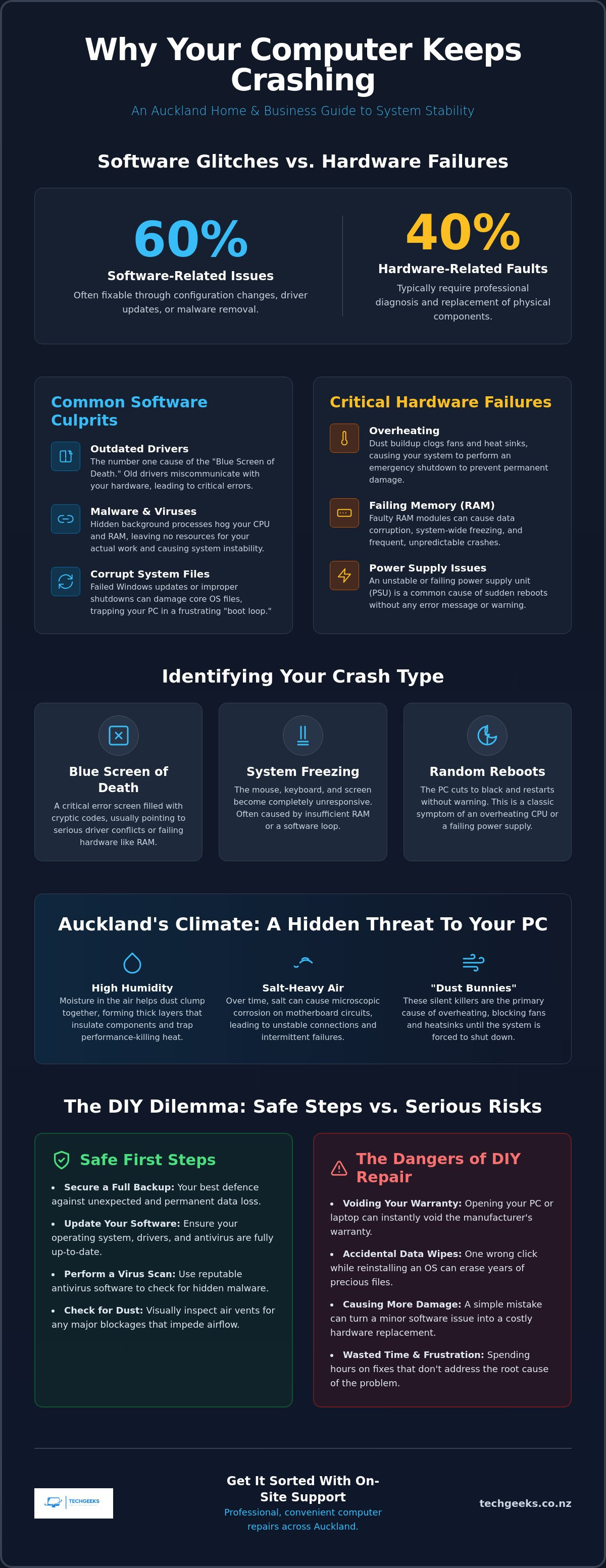
- The Blue Screen of Death (BSOD): This infamous blue display is filled with cryptic error codes like "WHEA_UNCORRECTABLE_ERROR". These are diagnostic clues that point to driver conflicts or failing memory.
- System Freezing: This occurs when the mouse and keyboard stop responding. It often indicates that the processor is stuck in an infinite loop or the system has run out of available RAM.
- Random Reboots: If your PC cuts to black without warning, it is often a sign of power supply issues or critical overheating.
Local Environmental Factors
Living in the City of Sails has its perks, but the environment can be brutal on electronics. Auckland's humid climate and salt-heavy air are major contributors to why a computer keeps crashing Auckland homes and offices. High moisture levels cause dust to clump together more easily, creating a thick, felt-like layer over cooling fans and heatsinks. These "dust bunnies" are silent killers. They trap heat, leading to the thermal shutdowns mentioned earlier. Furthermore, salt air can lead to microscopic corrosion on motherboard components over time, creating unstable connections that cause intermittent failures. Regular internal cleaning is often the simplest way to prevent these protective crashes from becoming permanent hardware failures.
Software Glitches vs. Hardware Failures: The Great Debate
Is your PC suffering from a ghost in the code or a physical breakdown? When your computer keeps crashing Auckland technicians usually start by asking this fundamental question. Broadly speaking, about 60% of system failures are software-related, while the remaining 40% stem from hardware issues. This distinction matters because it dictates your next move. Software problems are often fixable through configuration changes or cleanups. Hardware failures, however, typically require specialised replacement parts to get you back up and running.
One of the most common causes of instability is the "Conflict factor." This happens when two different programmes try to use the same system resource at the same time. Think of it like two people trying to drive the same car simultaneously. The result is a total system halt. Professional repairers use a structured troubleshooting methodology to isolate these conflicts. By following a logical path, they can determine if the issue is a simple driver clash or something more sinister buried in the physical components.
Software Culprits: Malware and Drivers
Outdated drivers remain the number one cause of the "Blue Screen of Death" in modern Windows systems. A driver is essentially a translator between your software and your hardware. If that translator is using an old dictionary, things get lost in translation. Similarly, virus and malware infections can wreak havoc. These hidden background processes hog your CPU and RAM, leaving nothing for your actual work. Sometimes, even a standard Windows Update can go wrong, trapping your machine in a frustrating "boot loop" where it restarts endlessly before reaching the desktop.
Hardware Failures: Heat and RAM
If your software is clean, we look at the physical parts. Overheating is a frequent offender. If your laptop fan sounds like a jet engine, it is struggling to stay cool. This is a common reason why a computer keeps crashing Auckland wide, especially during the humid summer months. Once the temperature hits a critical limit, the system shuts down to prevent permanent damage. Failing RAM is another common culprit. Memory errors lead to unpredictable behaviour, such as random crashes that happen only when you are multitasking. Finally, hard drive degradation is the most serious threat. If you hear clicking sounds or experience extreme slowness, your data is at risk. If you are unsure which side of the debate your PC falls on, a quick chat with the on-site specialists at Tech Geeks can provide the clarity you need.
DIY Troubleshooting: Steps to Try Before Calling a Pro
Before you panic and reach for the phone, there are several steps you can take to see if your issue is a one-off glitch or a recurring nightmare. However, before you change a single setting, ensure your files are safe. Always back up your critical data to an external drive or cloud service first. If your computer keeps crashing Auckland, the last thing you want is a troubleshooting attempt to be the final straw for a failing hard drive. We want to keep your memories and work files exactly where they belong.
A great place to start is the "Reliability Monitor." Just type "reliability" into your Windows search bar. It provides a visual timeline of every error and crash your system has faced. This helps you spot patterns, like a specific app failing every morning at the same time. For more detailed steps, this software troubleshooting guide offers excellent foundational advice for isolating tricky bugs. You should also try booting into "Safe Mode." This starts Windows with only the bare minimum drivers. If the crashes stop while in Safe Mode, you know a third-party app or a non-essential driver is the culprit.
The Quick Fix Checklist
- Perform a "Hard Reset": Shut down your PC, unplug the power, and hold the power button for 30 seconds. This drains the capacitors on the motherboard and can clear "sticky" electrical errors that a standard restart misses.
- Run Windows Update: Don't just look at the main screen. Check "Advanced options" then "Optional updates" for specific driver fixes that aren't included in the standard patches.
- Use System File Checker: Open Command Prompt as an administrator and type
SFC /scannow. This command scans and repairs corrupted Windows files automatically, which is a common fix for OS stability issues.
Monitoring Your Temps
As we discussed earlier regarding Auckland’s humidity, heat is a major factor. Use free tools like HWMonitor to check your CPU and GPU temperatures. If they are idling above 50°C, it's time for a clean. A can of compressed air can blow out the dust bunnies from your vents, often dropping temperatures by 10°C or more. Stop immediately if you smell ozone or burning plastic; this indicates a serious electrical fault that DIY cleaning won't fix. If these steps don't stop the cycle and your computer keeps crashing Auckland, it's time to bring in a professional who can look deeper into the hardware without risking further damage.
The Risks of DIY: When Your 'Quick Fix' Becomes a Disaster
It is tempting to think that a few YouTube tutorials can replace years of technical training. However, when your computer keeps crashing Auckland, a well-meaning DIY attempt can quickly escalate into a total system failure. Modern laptops and desktops are built with incredibly tight tolerances. Opening a chassis today often involves navigating fragile ribbon cables and plastic clips that snap with the slightest pressure. Most importantly, cracking that seal frequently voids your manufacturer's warranty. What started as a simple troubleshooting session could end with you being denied a legitimate warranty claim for a much larger issue later on.
The risks aren't just physical. We often see users attempt to fix instability by diving into the BIOS or UEFI settings. This is the "brain" of your motherboard. One wrong command here can accidentally wipe your boot priority or, worse, trigger a secure erase of your storage. Unlike a software glitch, these mistakes can lead to permanent data loss. You should also be wary of "magic" software found online. Many registry cleaners and PC optimisers are actually malware in disguise. They promise to stop your crashes but instead install background trackers that cause even more instability and compromise your privacy.
Have you considered the invisible threat of Electrostatic Discharge (ESD)? It is a silent killer of Auckland computer components. A tiny static spark, so small you can't even feel it, is enough to fry the delicate circuits on a RAM stick or motherboard. Professional technicians use grounded mats and anti-static wristbands to prevent this. Without this equipment, you are essentially playing Russian roulette with your hardware every time you touch an internal component.
Protecting Your Data
Many people think the only way to fix a crashing PC is to "format and reinstall." This is a scorched-earth policy. A professional repair prioritises data integrity, seeking to fix the underlying issue without deleting your photos and documents. If your computer keeps crashing Auckland and you notice extreme slowness or clicking noises, stop immediately. These are signs of a failing hard drive. Continued use or DIY repair attempts will only make data recovery more difficult and expensive. We focus on saving your files first before we even think about the OS.
When to Call an Auckland Expert
- Boot-up Failures: If the crash happens before the Windows logo even appears, you are likely facing a hardware or BIOS fault.
- Physical Warnings: Never ignore the smell of ozone, visible sparks, or grinding noises from your fans or drives.
- Persistent Issues: If you have tried basic software updates and the system still reboots every hour, the problem is deeper than a simple setting change.
Don't risk your data or your hardware on a guess. It is much safer to book an on-site repair with Tech Geeks and have a friendly expert sort the problem properly at your home or office.
Tech Geeks: Auckland’s On-site Computer Repair Specialists
When your computer keeps crashing Auckland traffic is the last thing you want to deal with. Why struggle with tangled cables and difficult parking when we can bring the expertise directly to your doorstep? We specialise in mobile, on-site computer and laptop repairs, turning your dining table or office desk into a professional repair station. Our technicians are experts in both complex hardware troubleshooting and surgical virus removal. We don't just patch the immediate problem. We look at the big picture to ensure your system is stable for the long haul, providing transparent pricing and reliable service across every suburb.
Why Our On-site Service Wins
Convenience is just the beginning. We work around your busy schedule, arriving at a time that actually suits your life. You get the unique opportunity to watch the repair process unfold in real-time, allowing you to ask questions and learn more about your machine as we work. This transparency builds a level of trust that a workshop behind closed doors simply cannot match. Being on-site also allows us to perform a full network check. Sometimes, what looks like a system crash is actually a conflict with your router or a failing Wi-Fi signal. We make sure your entire digital environment is working in harmony before we leave.
Get Your Computer Sorted Today
Our process is designed to be fast-paced and stress-free. It starts with a thorough diagnostic to find the root cause, followed by a clear quote so there are no surprises on your bill. Once you approve the path forward, we move to the repair and finish with a full system optimisation to prevent future failures. Whether you are on the North Shore, in the CBD, or out South, we cover the entire Auckland region with personal dedication. We are committed to high standards and dependable outcomes, taking the technical burden off your shoulders so you can stop worrying about your data and get back to work.
Ready to stop the cycle of reboots and lost work? Book an on-site technician in Auckland now and experience the "sorted" feeling of a professional fix. If your computer keeps crashing Auckland homes and offices shouldn't have to wait days for a solution. Let our friendly experts handle the technical headaches while you focus on what matters most.
Get Your Tech Back on Track Today
Dealing with a system that fails at the worst possible moment is more than just a technical hurdle; it is a drain on your productivity and peace of mind. We have explored how local environmental factors and software conflicts often trigger these issues, and why risky DIY fixes can sometimes lead to permanent data loss or voided warranties. You now know that identifying whether you face a hardware failure or a software glitch is the first step toward a permanent solution that lasts.
If your computer keeps crashing Auckland, you don't have to waste another afternoon fighting traffic or risking your files. Our local technicians come directly to you, providing expert on-site hardware diagnostics and specialised data recovery services to protect what matters most. We take the technical burden off your shoulders with a sense of personal dedication and professional care, ensuring your machine is fully optimised before we leave.
Don't wait for the next "Blue Screen of Death" to disrupt your day. Book your on-site computer repair in Auckland today and let our friendly experts get your setup sorted. You deserve a reliable machine that works as hard as you do.
Frequently Asked Questions
Why does my computer keep crashing even after I restarted it?
Restarting only clears your temporary memory; it doesn't fix underlying hardware faults or corrupted system files. If your computer keeps crashing Auckland technicians often find that deep-seated driver conflicts or overheating components are the real culprits. A restart acts as a temporary band-aid, but it cannot repair a failing hard drive or remove persistent malware that loads every time your system boots up.
How much does it cost to fix a crashing computer in Auckland?
Repair costs across Auckland vary depending on whether the issue is software-based or requires replacement hardware. General workshop rates in the region often start from $75 per hour for personal machines, though the total investment depends on the complexity of the diagnostic. We always provide a clear quote after assessing your system so you know exactly what to expect before any work begins on your machine.
Can a virus cause my computer to crash repeatedly?
Yes, malware and viruses are frequent causes of instability because they hog system resources and conflict with legitimate processes. These malicious programmes often run hidden tasks in the background that overload your CPU or RAM, leading to a total system halt. Our specialised virus removal service identifies and eliminates these hidden threats, restoring the stability your system needs to run smoothly without those frustrating and frequent interruptions.
Will I lose my photos and files if my computer keeps crashing?
There is always a risk of data loss if a crash occurs while the computer is saving a file, but your data is usually recoverable. If your computer keeps crashing Auckland experts recommend stopping use immediately to prevent further wear on your storage drive. We prioritise data recovery and integrity in every repair, ensuring your precious memories and business documents are protected throughout the entire troubleshooting process.
How long does a typical on-site computer repair take?
Most on-site repairs are completed within one to two hours, depending on the severity of the problem we find. Simple software fixes or driver updates are often resolved quickly, while deep hardware troubleshooting might take a bit more time. Because we bring the tools directly to your home or office, there is no waiting for "shop turnaround" times, allowing you to get back to your day much faster.
Is it worth fixing an old computer that keeps crashing, or should I buy a new one?
It often depends on the age of the machine and the cost of the specific parts needed. If a simple RAM upgrade or a clean Windows reinstallation can add two more years of life to your PC, it is usually a very cost-effective choice. However, if multiple hardware components are failing on a machine over five years old, we will provide an honest assessment of whether a replacement is your better long-term option.
Do you offer on-site laptop repair in Auckland suburbs?
Yes, we provide mobile on-site laptop repair across the entire Auckland region, from the North Shore to the South. You don't need to worry about the hassle of unplugging every cable or fighting through city traffic to find a repair shop. Our technicians travel to your home or office to handle everything from power issues to internal hardware troubleshooting right there on the spot.
What is the Blue Screen of Death and can it be fixed?
The Blue Screen of Death (BSOD) is a "stop error" that appears when Windows encounters a critical problem it cannot resolve. It is actually a safety mechanism designed to prevent permanent hardware damage. Yes, it can absolutely be fixed. By reading the specific error codes provided on the screen, our experts can pinpoint the exact driver or hardware component causing the failure and resolve the issue for good.

