

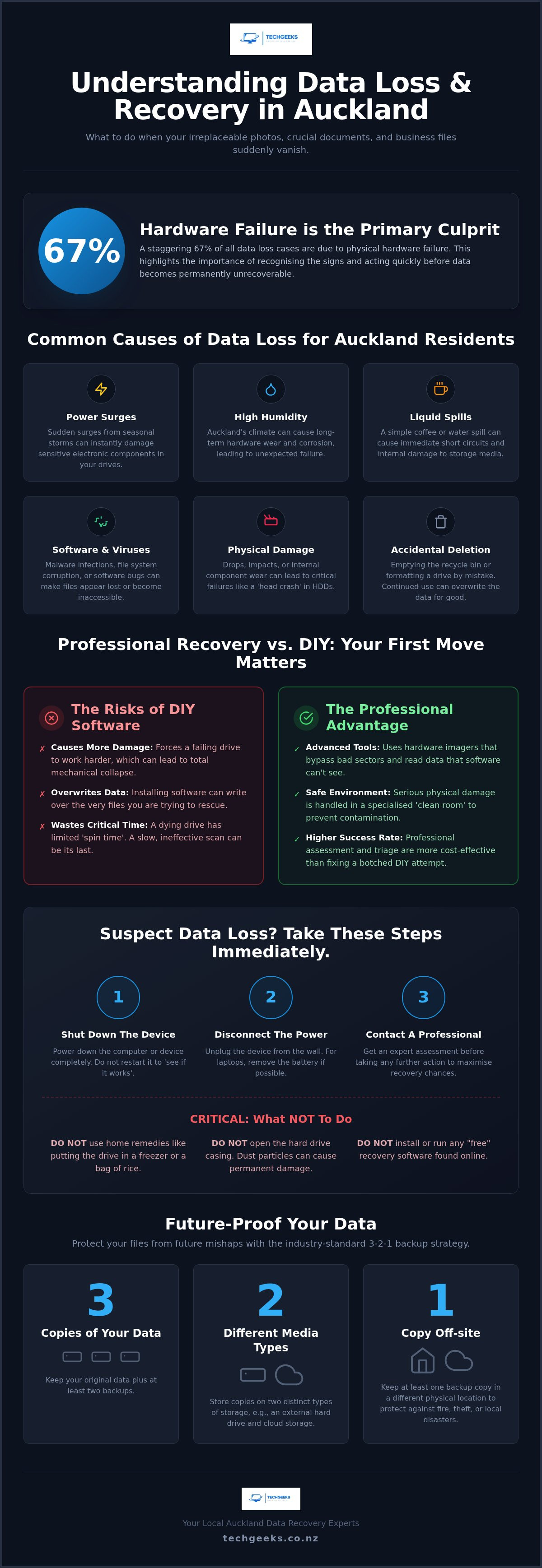
What would you do if your laptop refused to start this morning? Imagine losing your family photos and critical business files in an instant. It's a heart-stopping moment that many Aucklanders face, especially since hardware failure accounts for a staggering 67% of all data loss cases. You're likely feeling the pressure of potential permanent loss and the dread of high lab fees or being without your computer for weeks on end.
We understand that your data is your life. You need a solution that's both fast and transparent. Our expert data recovery Auckland team specialises in on-site support, offering a clear assessment so you know exactly where you stand. We promise to help you safely retrieve your most important documents while cutting through the technical jargon that often makes these situations feel even more overwhelming.
In this article, we'll show you how our local team identifies recovery chances and provides the professional support needed to get your digital life back on track. You'll also discover practical strategies to future-proof your devices and ensure this never happens again.
Key Takeaways
- Identify how local environmental factors like Auckland's high humidity and storm-related power surges can lead to sudden hardware failure.
- Understand why professional data recovery Auckland services are significantly safer than DIY software, which often puts more stress on a failing drive.
- Learn about the convenience of on-site mobile diagnostics that bring expert help directly to your home or office anywhere from the North Shore to East Tamaki.
- Discover how to implement the 3-2-1 backup strategy to ensure your critical files and photos are protected against future mishaps.
Common Causes of Data Loss for Auckland Residents
Data recovery is the technical process of retrieving inaccessible, lost, or deleted information from storage media like hard drives, SSDs, and USB sticks. In Auckland, our local environment often plays a hidden role in these failures. Sudden power surges during seasonal storms can fry delicate circuitry in an instant. High humidity levels also contribute to long-term hardware wear, while a simple accidental liquid spill during a morning coffee can cause immediate internal damage.
It's vital to distinguish between logical and physical failures. A logical failure occurs when your hardware is healthy, but software bugs, corruption, or accidental deletions make your files vanish. A physical failure involves damaged components, often signalled by clicking, grinding, or buzzing noises. A head crash is a physical failure where the read/write head touches the platter and potentially causes permanent damage to the data surface. If you suspect hardware damage, seeking professional data recovery Auckland services immediately is the safest way to prevent further harm.
Hardware Failure vs Software Corruption
Solid State Drives (SSDs) and traditional Hard Disk Drives (HDDs) fail in very different ways. While HDDs often give you a warning through clicking sounds, SSDs might simply stop working without any notice at all. Sometimes, the issue isn't the hardware itself. Nasty virus infections can "hide" your data or encrypt files, making them appear deleted. In these cases, professional virus removal can often restore your access and protect your files from further corruption.
The Risk of Accidental Deletion and Formatting
Did you accidentally empty the recycle bin? Don't panic just yet. Emptying the bin doesn't wipe the data immediately; it just tells the computer that the space is now "available" for new files. The real danger comes from continued use. If you keep downloading files or even browsing the web, your computer might overwrite that "available" space with new data, making the original files impossible to retrieve. If you've deleted something important, stop using the device right away to keep your recovery chances high.
Professional Data Recovery vs DIY: Why Your First Move Matters
When your computer fails, it's tempting to reach for the first "free" recovery tool you find online. But did you know that your first move often determines whether your files are gone for good? Professional data recovery Auckland specialists use advanced hardware imagers that can bypass bad sectors and read data that standard software simply can't see. In contrast, consumer-grade software often forces a failing drive to work harder, which can lead to a total mechanical collapse.
A professional assessment is almost always more cost-effective than trying to fix a botched DIY attempt. While many software-related issues or minor hardware glitches can be triaged through on-site support, serious physical damage requires a specialised "clean room" environment to prevent dust from ruining the platters. Starting with a professional "triage" allows you to understand the risks before making a high-stakes gamble with your data.
The Dangers of "Free" Recovery Software
Generic software often requires installation on the very drive you are trying to rescue. This can overwrite the exact files you're hoping to save. There's also the "one shot" rule to consider. A dying mechanical drive has a limited amount of "spin time" left before it gives up entirely. If you waste that time on a slow, ineffective software scan, you might lose the chance for a professional to step in later.
What to Do the Moment You Suspect Data Loss
If you hear clicking or can't find your files, follow these steps immediately:
- Step 1: Shut down the device. Don't "try it one more time" to see if it works.
- Step 2: Disconnect the power. Avoid home remedies like the "rice trick" or putting your drive in the freezer; these often cause irreversible moisture damage.
- Step 3: Contact a computer technician in Auckland for a professional assessment.
Taking these quick steps keeps your options open and protects your hardware from further strain. If you're feeling unsure about the next step, a quick chat with a local expert can provide the clarity you need. You can find out more about our on-site support by visiting our services page.
The Tech Geeks On-Site Data Recovery Process
Auckland is a busy place, and we know you don't have time to fight traffic just to drop off a broken laptop. Our mobile service covers the entire region, from the North Shore down to East Tamaki. We bring the expertise directly to your doorstep. This on-site approach is often much faster than traditional shop-based services; it's also far more secure for sensitive business files that shouldn't leave your premises.
When we arrive, we start with a thorough diagnostic phase. We identify whether you're facing a logical glitch or a physical hardware failure. We believe in transparent communication, so we'll give you a clear update on the health of your data before any work begins. You'll know exactly what the recovery chances are before you commit to the next steps.
On-Site Diagnostics and Triage
We don't just guess and hope for the best. Our technicians use specialised hardware tools to clone your drive bit-by-bit before we ever attempt a recovery. This protects your original data from further wear. Having a friendly expert explain the process right there in your Auckland home or office helps take the stress out of the situation. You can see the tools we use and ask questions as we work.
SSD and Hard Drive Data Recovery Auckland
Modern technology has changed the game. Many new laptops use soldered SSDs, which require a different approach than older, mechanical desktop hard drives. We have the expertise to handle both scenarios. If you want to see how we've helped others in the past, take a look at our hard drive data recovery case study for a real-world example of saving critical files.
Ready to get your files back? Book a technician to visit your Auckland location today and let's get started on your recovery.
Future-Proofing: Robust Backup Strategies for Aucklanders
The best way to manage the stress of data recovery Auckland is to ensure you never have to go through it again. We always recommend the 3-2-1 backup rule to our local clients. It's a simple but effective gold standard: keep three copies of your data, use two different types of media, and ensure at least one copy is kept off-site. This layered approach means that even if one device fails, your files remain safe and accessible.
For Auckland small businesses, manual backups are often the first thing to be forgotten during a busy week. We encourage you to implement automated backup schedules that run in the background. Combining this with regular hardware troubleshooting allows you to catch failing components before they lead to a total system collapse. It's much easier to replace a drive that's starting to show its age than it is to rescue files from one that has already died.
Cloud vs Physical Backups
Cloud-based solutions like Microsoft 365 or iCloud provide excellent protection against local hardware failure. They are easy to set up and offer "set and forget" peace of mind. However, don't rely solely on a physical external drive sitting right next to your laptop. If your office experiences a break-in or a fire, you could lose both your primary machine and your backup at the same time. Using a cloud provider for that off-site copy is essential for true security.
Signs Your Hard Drive is Dying
Your hardware often sends out distress signals before it fails completely. If you notice your system is suddenly sluggish or you experience frequent computer crashes in Auckland, it's time to act. Files that suddenly go "missing" or folders that take forever to open are also major red flags. Never ignore a "S.M.A.R.T." error message on your screen; this is your drive's way of telling you that its time is almost up. Acting quickly on these warnings can be the difference between a simple file transfer and a complex data recovery Auckland project.
Get Your Files Back with Confidence
Losing access to your most important files is a stressful experience, but it doesn't have to be a permanent one. We've seen how professional on-site diagnostics can identify the root cause of a failure without the risks associated with "free" DIY software. By choosing expert data recovery Auckland services, you're giving your hardware the best possible chance of a successful retrieval while avoiding the inconvenience of lengthy lab stays.
Our team of Auckland-based mobile technicians is dedicated to providing an empathetic and professional service tailored to your specific needs. We pride ourselves on a high success rate for deleted file retrieval and a transparent process that keeps you informed every step of the way. Remember, the sooner you stop using a failing device and seek professional help, the higher the likelihood of a full recovery.
Don't risk your data—book an on-site assessment with Tech Geeks today. Let's work together to retrieve your critical documents and set up a robust backup strategy that keeps your digital life secure for the long term. You've got this, and we're here to help.
Frequently Asked Questions
Can you recover data from a clicking hard drive?
Yes, we can often retrieve files from a clicking drive, but this sound is a serious warning sign of physical failure. It usually means the read/write heads are struggling to access your data. You must shut down the device immediately to prevent the heads from scratching the internal platters and causing permanent loss. Our on-site assessment will determine if the issue is something we can solve immediately or if it requires more advanced intervention.
How much does data recovery in Auckland typically cost?
The cost of recovery depends entirely on the type of failure and the complexity of the retrieval process. A simple logical recovery where files were accidentally deleted is generally more straightforward than a complex hardware failure involving burnt components or mechanical issues. We provide a transparent diagnostic phase during our visit so you understand the scope of the work before we begin. This helps you avoid the anxiety of unknown lab fees or hidden costs.
Is my data kept confidential during the recovery process?
Absolutely, your privacy is our top priority. We handle your personal photos, sensitive documents, and critical business files with the highest level of professional discretion. Our technicians follow strict security protocols to ensure your information remains confidential from the moment we start the data recovery Auckland process until your files are safely restored. We treat your digital life with the same respect and care that we would our own.
How long does the data recovery process take?
The timeframe varies based on the size of the drive and the severity of the damage. A simple software-based recovery might be completed during our initial visit, while a failing drive that requires bit-by-bit cloning can take several hours or more to process safely. We focus on providing a fast and efficient service to get you back up and running as quickly as possible. We will always give you a realistic estimate after our first assessment.
Do you come to my home or office in Auckland for data recovery?
Yes, we are a fully mobile service and will come directly to your location anywhere in the Auckland region. Whether you are in the CBD, the North Shore, or West Auckland, our technicians bring the necessary tools to you. This saves you the inconvenience of leaving your computer at a shop for weeks and ensures that your sensitive hardware stays in a secure environment while we work on the retrieval.
What happens if my data cannot be recovered?
If the damage is so severe that the data is truly unrecoverable, we will provide you with a clear, honest explanation of the situation. We believe in being transparent about recovery chances from the very first diagnostic step. While we have a high success rate for logical issues and failing drives, some catastrophic hardware failures can be final. In those rare cases, we will advise you on the best way to protect your remaining devices and prevent a repeat occurrence.


