

Why should a cracked screen cost you an entire day fighting Auckland traffic just to reach a repair shop? If you've ever stared at a spiderweb of glass across your display, you know the immediate panic of a disrupted deadline. It's not just the broken hardware. It's the nightmare of finding parking in the CBD or Newmarket, the fear of hidden costs at big-box retailers, and the anxiety of leaving your private data in a stranger's hands for days on end.
We agree that your time is your most valuable asset. You shouldn't have to choose between a functional device and your daily schedule. This guide explores how to secure professional laptop screen repair Auckland residents can actually rely on, delivered right to your front door or office. We'll show you how on-site hardware troubleshooting can save you hundreds in lost productivity and get you back online with clear, upfront pricing and total peace of mind. Discover the simple way to fix your screen today without the usual stress or overpriced replacements.
Key Takeaways
- Save hours of your day by choosing a mobile service that brings the repair shop directly to your Auckland home or office.
- Learn how to identify if you have a simple glass crack or internal LCD damage to ensure you get the most accurate quote.
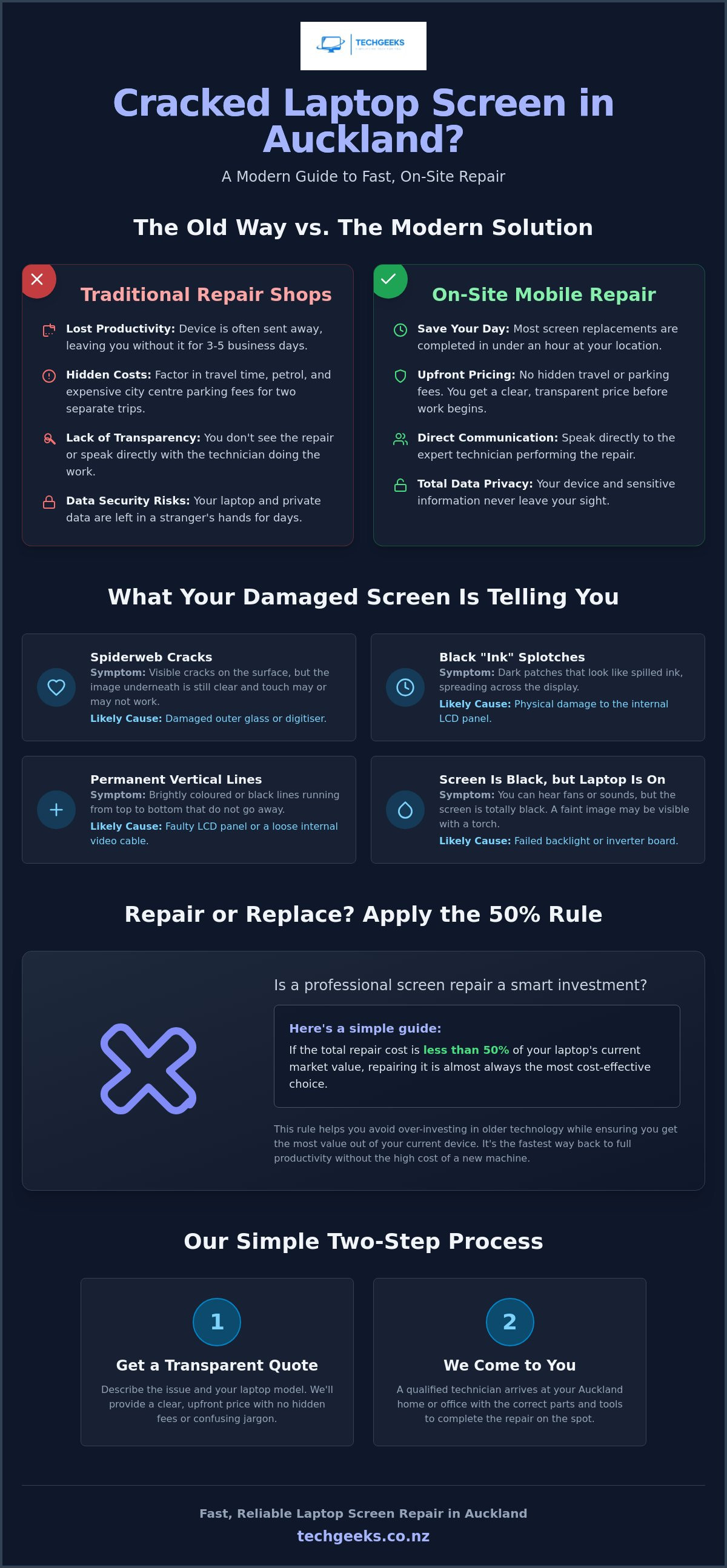
- Apply the "50% rule" to decide if a professional laptop screen repair Auckland is a smart investment or if it's time to upgrade.
- Discover the simple two-step process for receiving an upfront, transparent price without any hidden fees or confusing technical jargon.
- Find out why local expertise and on-site hardware troubleshooting are the fastest ways to protect your data and restore your productivity.
Cracked Your Laptop Screen in Auckland? Here is Why On-Site Repair is a Game Changer
Dealing with a shattered display is stressful enough without the added headache of logistics. Traditionally, fixing a computer meant packing it up, finding a box, and trekking across town. On-site laptop screen repair Auckland changes that dynamic completely. It means a qualified technician arrives at your doorstep, whether that is your home office in Ponsonby or a corporate suite in the CBD, equipped with the specific tools and replacement parts to fix the issue on the spot.
Most people don't realise that a screen swap is often a straightforward hardware task for a pro. Once the correct replacement panel is sourced, the actual physical repair usually takes less than an hour. Understanding the basics of how LCD screens work is helpful because these components are incredibly delicate. They consist of multiple layers of glass and liquid crystals that require precision handling. By having the repair done right in front of you, you eliminate the risk of your device being tossed into a courier van or sitting on a dusty shelf for a week.
The True Cost of Traditional Repair Shops
When you look at a repair quote from a big-box retailer, you aren't seeing the full picture. You have to factor in the "Auckland Factor." This includes the petrol spent idling on the motorway and the extortionate parking fees in areas like Newmarket or the city centre. You'll likely have to make two trips; one to drop it off and another to pick it up. There is also the productivity tax. Many large stores don't even fix laptops on-site. They often ship your device to a central hub in another city, leaving you without your primary work tool for three to five business days. For a student or a remote worker, that delay is often more expensive than the repair itself.
Why Mobile Support is the Modern Solution
Mobile support offers a level of transparency that a workshop simply cannot match. You get to talk directly to the person doing the work. They can explain the fix in plain English and offer tips on how to maintain your hardware. This personalised approach fits perfectly into a modern work-from-home schedule. You don't need to block out half a day for errands. Instead, you can keep working on a secondary monitor while the technician handles the hardware troubleshooting in your lounge. It's about regaining control of your day. Most importantly, your private data stays exactly where it belongs; under your roof and within your sight.
LCD vs Digitiser: Identifying Your Screen Damage
When you look at your laptop, you're actually looking at a "sandwich" of different technologies. Most people use the word "screen" as a catch-all term, but identifying which layer is broken is the first step toward a successful fix. The top layer is usually the digitiser or protective glass, while the liquid crystal display (LCD) sits safely underneath. If you've dropped your device, the damage might only be skin deep, or it could have penetrated the internal display components.
Visual cues are your best diagnostic tool. Do you see black splotches that look like spilled ink? Or perhaps there are permanent vertical lines running through your spreadsheet? These are classic signs of internal LCD failure. If the image itself looks perfect but the screen won't respond to your touch, the digitiser is the culprit. Choosing to fix these specific components rather than discarding the entire unit has significant environmental benefits of repair, as it reduces electronic waste and keeps harmful materials out of the local ecosystem.
Sometimes the screen appears completely black even though you can hear the fans spinning. Try the "torch test." Shine a bright light directly onto the display. If you can see a faint image of your desktop, your backlight or inverter has failed. When booking a laptop screen repair Auckland service, providing these details helps your technician arrive with the exact replacement part needed for your specific model.
Common Symptoms and What They Mean
The "spiderweb" crack is the most common injury we see. This usually happens when a pen is left on the keyboard before closing the lid. If the crack is on the surface and the image is clear, it's likely just the outer glass. However, flickering or "ghosting" images can be more deceptive. This might not be a broken panel at all; it could simply be a loose internal video cable, known as an EDP cable, that has vibrated out of place over time. If you're unsure which part has failed, a quick hardware troubleshooting session with a local expert can clear things up immediately.
Diagnostic Table: Screen Damage Types
| Symptom | Likely Cause | Repair Complexity |
|---|---|---|
| Spiderweb crack; image is perfect | Outer Glass / Digitiser | Moderate |
| Ink blots or coloured vertical lines | LCD Panel | Standard Replacement |
| Touch unresponsive; image is perfect | Digitiser Failure | High (often fused) |
| Dim screen (only visible with a torch) | Backlight / Inverter | Variable |
| Flickering when moving the lid | Loose EDP Cable | Low (no parts needed) |
Repairing modern touchscreens, especially on 2-in-1 convertible laptops, is generally more complex. In these devices, the glass and the LCD are often fused together with optical adhesive. This means even a small crack in the glass usually requires replacing the entire assembly. Regardless of the damage type, getting a professional laptop screen repair Auckland specialist to look at it ensures the delicate internal ribbons aren't damaged during the process.
Repair vs Replace: Is Your Broken Screen Worth Fixing in 2026?
Is your laptop truly at the end of its life, or is it just having a bad day? Before you rush out to spend NZ$1,500 on a new machine, take a breath. Most users in 2026 find that a laptop screen repair Auckland service is far more cost-effective than a total replacement. We generally recommend the "50% Rule." If the quote to fix your display is less than half the price of an equivalent new laptop, repairing is the logical choice. With the cost of new IT hardware rising due to global demand for AI-capable components, keeping your current device running is often the smartest financial move.
The value of the repair depends heavily on your specific model. If you own a premium machine like a MacBook Pro or a Dell XPS that cost over NZ$2,000, investing NZ$400 in a new screen is a bargain. These high-end devices are built to last five to seven years. However, if you are using a budget Chromebook or an entry-level laptop that originally cost NZ$600, a professional screen replacement might be harder to justify. Laptops under three years old are almost always worth the fix, especially since their internal processors and RAM are still highly competitive with brand-new models sitting on retail shelves today.
There is also the "hidden" value of your current device to consider. Replacing a laptop isn't just about the hardware cost. It involves the hours of unpaid labour required to migrate your files, re-install specialised software licences, and familiarise yourself with a new keyboard layout. When you opt for laptop screen repair Auckland wide, you keep your data exactly where it is. You don't have to worry about losing saved passwords or custom settings. You simply get your familiar, powerful tool back in working order by the end of the day.
When to Definitely Repair
If your laptop features high-end specs like an i7 or i9 processor and 16GB of RAM, it still has plenty of life left in it. These machines handle modern multitasking with ease. You should also choose repair if the rest of the device is in mint condition. If the battery still holds a strong charge and the keyboard feels as good as the day you bought it, a broken screen is just a minor hurdle. This is especially true if you have complex software setups that are a nightmare to move to a new system.
When it Might Be Time to Upgrade
Sometimes, the maths just doesn't add up. If your laptop is over five years old and has started feeling sluggish, a broken screen might be the final sign to move on. This is particularly true if you're facing multiple hardware issues, such as a failing battery or loose hinges, alongside the display damage. Additionally, certain specialised parts, like high-resolution OLED panels for older niche models, can sometimes be prohibitively expensive to source. In these rare cases, we'll be honest with you if an upgrade is your better path forward.
What to Expect During Your Auckland On-Site Screen Replacement
Getting your technology back in order shouldn't feel like a part-time job. We've streamlined our process to ensure your laptop screen repair Auckland experience is as smooth as possible. Forget the "bring your device to us" model that leaves you stranded without a computer for days. Our mobile service is designed around your schedule, not ours. Here is exactly how we get you back online.
- Step 1: The Initial Contact. Reach out to us with your laptop model number. You can usually find this on a small sticker on the bottom of the case. This allows us to identify the exact replacement panel required.
- Step 2: The Upfront Quote. We provide a clear, transparent price that includes both the specific panel and the on-site labour. There are no hidden fees or "surprise" surcharges.
- Step 3: The Arrival. A technician arrives at your Auckland home or office at the time we agreed upon. No more waiting around for a courier who never shows up.
- Step 4: The On-Site Fix. The repair happens right there in a clean, static-safe environment. Your kitchen table or a spare desk is perfect for this.
- Step 5: Quality Testing. Before we pack up, we perform a full diagnostic. This includes checking brightness levels and ensuring there are zero dead pixels or colour distortions.
Preparing for Your Technician's Visit
To make the process even faster, you can do a few small things before we arrive. Please ensure your laptop is charged, or at least have your power cable handy. We'll need a small workspace with decent lighting to see the tiny screws and delicate ribbons inside your machine. Finally, have your login password ready. We need to get past the lock screen to verify that the touch functions and display settings are perfectly calibrated after the fix.
Brand Compatibility and Parts
We take pride in being a versatile "friendly expert" for all major hardware. Our team services a wide range of brands, including HP, Dell, Lenovo, ASUS, Acer, and Apple. We only use high-quality replacement panels that match or exceed your original manufacturer specifications. Because we believe in the quality of our work, every laptop screen repair Auckland job comes with a 12-month warranty on both parts and labour. This gives you total peace of mind that your "new" screen is built to last.
Ready to see your desktop clearly again? You can book your on-site laptop repair now and have one of our local experts at your door before you know it.
Why Tech Geeks is Auckland’s Top Choice for Fast Screen Repairs
Choosing the right team for laptop screen repair Auckland wide shouldn't be a gamble. We aren't a faceless international franchise or a sterile big-box service desk. We're locals who know this city inside out. Whether you're based on the North Shore, working from a terrace in Ponsonby, or running a business down in Papakura, we understand the local rhythm. We know that when your screen goes dark, your productivity stops. That is why we've built a service that prioritises your location and your schedule over our own workshop logistics.
Technical issues are intimidating enough without a technician hiding behind "geek-speak" or complex industry jargon. Our philosophy is simple: we explain the fix in plain English. You'll know exactly what part is being replaced and why it's necessary. We believe that a well-informed customer is a happy one. By keeping the conversation transparent and functional, we strip away the anxiety that usually follows a hardware failure. You're not just getting a new screen; you're getting a friendly expert who respects your intelligence and your time.
Our support doesn't stop at the glass. While we're at your home or office, we can take a holistic look at your device's health. If you've noticed your system is feeling sluggish or you're worried about your current security, we can perform on-site virus removal or hardware troubleshooting. It's a comprehensive approach that ensures your laptop isn't just visible, but actually performing at its peak. Why waste an afternoon sitting in a mall food court waiting for a shop to open when you can have a professional handle everything in the comfort of your own space?
Our Commitment to Auckland Customers
We've built our reputation on a foundation of professional confidence and accessibility. Our technicians treat your home or office with the utmost respect, ensuring a tidy workspace and a quiet, efficient repair process. We're also committed to transparent pricing. You won't find any hidden "Auckland tax" or surprise call-out fees buried in the fine print. The quote we provide is the price you pay. Our primary focus is getting you back to your work, your studies, or your life as quickly as possible, without the usual stress associated with traditional repair centres.
Ready to Get Your Screen Fixed?
The days of unhooking every cable and fighting through CBD traffic for a basic repair are over. The mobile, on-site model is the most efficient way to restore your technology in 2026. You get to keep your data safe, watch the repair happen in real-time, and skip the queues entirely. We combine high-quality parts with local expertise to deliver a result that lasts. Don't let a cracked display hold you back for another minute.
Book your on-site laptop screen repair in Auckland today and experience the difference that a dependable, local guide can make for your technology.
Restore Your Productivity with On-Site Expertise
A shattered display shouldn't derail your entire week. You now have the tools to decide if a fix is right for your device and understand exactly what happens during a professional laptop screen repair Auckland service. By choosing a mobile technician, you skip the Newmarket parking battles and keep your private data safely under your own roof. It's the most efficient way to handle hardware failures in a busy city like ours.
Our expert on-site technicians operate across the city, providing a trusted local service with no hidden fees. We stand by our work with a 12-month warranty on all screen repairs, ensuring your laptop remains a reliable tool for years to come. Don't let a spiderweb crack slow you down when the solution can come directly to your kitchen table or office desk.
Ready to get back to work? Get a Free Quote for Your Laptop Screen Repair today. We'll help you see clearly again without the stress of overpriced workshop replacements or long wait times. You're only a few clicks away from a perfectly functional screen and a stress-free workday.
Frequently Asked Questions
How much does laptop screen repair cost in Auckland?
The cost varies depending on your laptop model and the type of panel required. A high-resolution MacBook Retina display or a specialised touchscreen assembly naturally costs more than a standard 15.6-inch LED panel. We provide a transparent, upfront quote once we have your model number, so you'll know the exact price before our technician arrives at your door.
How long does it take to fix a laptop screen on-site?
Most on-site screen replacements are completed in under an hour. Because our technicians come to your home or office with the correct parts ready to go, you don't have to wait days for a workshop queue. It is the most efficient way to handle a laptop screen repair Auckland wide, getting you back to your work or study with minimal disruption.
Do I need to back up my data before the screen is replaced?
You don't typically need to back up your data for a hardware-only fix like a screen replacement. We aren't touching your hard drive or operating system, so your files remain exactly where they are. However, keeping a regular backup is always a smart habit for any computer user, even though your data never leaves your sight during our visit.
Can you fix a touchscreen laptop on-site as well?
Yes, we can repair most touchscreen models at your location. These devices are slightly more complex because the touch digitiser is often fused to the LCD panel. When you provide your model number, we'll confirm the specific part requirements and ensure our technician is equipped to handle the delicate calibration needed for touch functionality.
What areas of Auckland do your technicians cover?
Our mobile team services the entire Auckland region. We travel everywhere from the North Shore and Whangaparaoa down to Papakura and Pukekohe. Whether you are in the heart of the CBD or working from a home office in the suburbs, we bring the professional tools and expertise directly to you.
Is there a warranty on the new laptop screen?
Every screen we install comes with a 12-month warranty on both the replacement part and our labour. We only use high-quality panels that match or exceed your original manufacturer's specifications. If you notice any manufacturing defects like dead pixels or flickering within the first year, we will return to fix it at no extra charge.
What if you don't have my screen model in stock?
If your specific screen isn't currently in our local inventory, we'll order it from our trusted suppliers immediately. Most standard replacement panels arrive within one to two business days. As soon as the part is ready, we'll contact you to book a convenient time for the on-site installation.
Can you fix other issues, like a broken hinge, at the same time?
We can certainly address other hardware problems while we are on-site. Broken hinges are a common issue that often leads to screen damage in the first place. If you've noticed your laptop is difficult to open or the battery isn't holding a charge, let us know during the booking process so we can bring the necessary parts for a complete fix.


